Kiosks make it easy for users to perform a variety of self service tasks, from placing orders to printing tickets, and a lot more without staff assistance. But because these devices operate in public spaces, they face security risks that regular office computers often don’t.
Users may try to access system settings, connect unauthorized devices, or exploit weaknesses in apps connected to payment systems or databases. That’s why kiosk security needs to go beyond fullscreen mode. Businesses need proper and secure management to keep kiosks safe and reliable.
In this guide, we’ll understand how security works in kiosks and why lockdown matters so much.
Why Do Kiosk Devices Need Stronger Security Controls?
A regular office computer sits behind a desk, used by an employee who has some level of accountability for it. A kiosk, however, is used across several industries and is easily accessible to the public. It is accessed by hundreds of strangers every day who have no stake in keeping the device secure.
That creates a distinct set of risks. Someone might try to exit the kiosk app and reach the operating system as a joke. Another person might plug in a USB device. A browser left unconstrained could be used to visit unrelated sites. If your kiosk stores customer information locally, it could potentially be accessed by almost anyone who finds a way past the app.
Then there are physical risks. People can tamper with card readers and exploit service ports if they’re not properly secured.
What are the Common Security Risks in Kiosk Systems?
Kiosks face several security risks, especially when they are placed in public areas or connected to business systems:
- Unauthorised access: Users may try to access system settings or restricted functions.
- Application misuse: Customers may use the application in ways that go beyond the intended workflow.
- Data exposure: Sensitive customer, payment, or business data may be accessed or stored insecurely.
- Physical tampering: Someone may damage the kiosk or connect unauthorised devices.
- Network threats: Attackers may exploit the kiosk as an entry point into connected systems.
What Is Kiosk Lockdown?
Kiosk lockdown is a set of security controls that restricts a device to its intended app. It also prevents access to the operating system and other system resources that customers have no business touching.
In practice, it means a customer using a self-ordering kiosk can browse the menu and pay, and nothing else. The device might be running Windows or Android underneath, but lockdown software controls what users can actually do on it.
How Does Kiosk Lockdown Work?
The configuration typically launches the kiosk application automatically on startup, then:
- It restricts access to the desktop and taskbar
- It blocks keyboard shortcuts that could open system utilities
- It limits which apps can run
- It prevents users from changing settings or accessing administrative tools
The exact approach varies by platform. Windows kiosks often use Assigned Access or Shell Launcher. Android devices use dedicated device mode or lock task mode. The user sees only what they’re supposed to see.
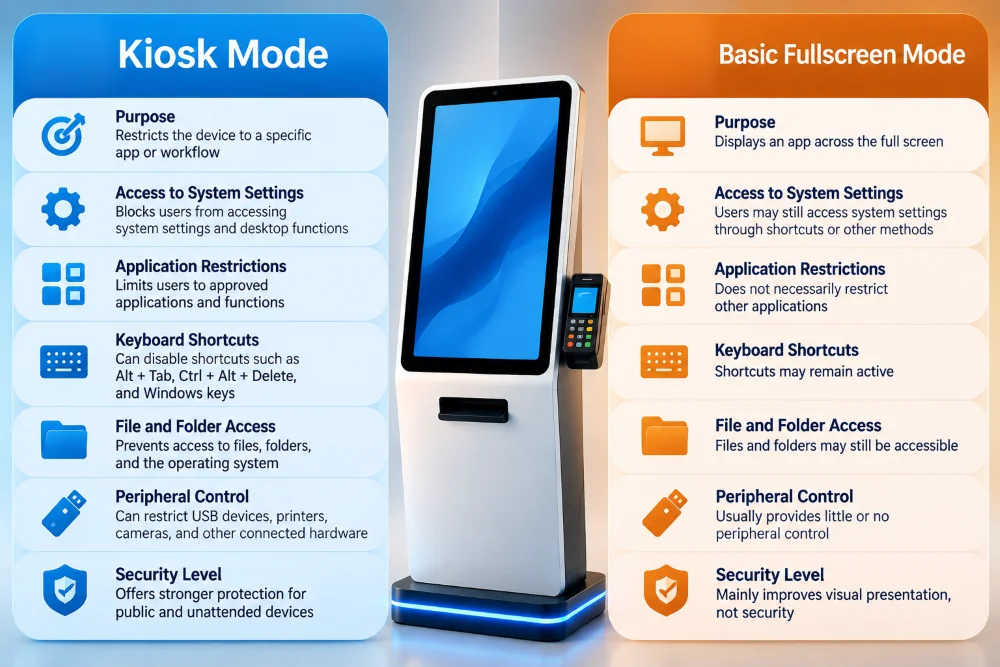
Kiosk Mode vs Basic Fullscreen Mode
Here’s a table explaining the distinction between the two:
What Should Kiosk Lockdown Control?
A secure kiosk needs more than one restriction. Users may interact with anything within the operating system, so each area deserves attention.
Operating System Access
Customers don’t need access to the desktop or the command line tools. Lockdown should restrict everything the users shouldn’t have access it while still giving administrators a secure way to access the system for maintenance.
Application Access
A kiosk may have multiple apps installed, but only specific ones should be available to the public. A file manager or random third party software isn’t meant to be available to the public. Application allowlisting defines exactly which apps and processes can run and blocks everything else.
Peripheral Access
Some kiosks need USB ports, printers, and card readers to function, but they also introduce risk. An exposed USB port could allow someone to connect external storage and attempt data transfer or introduce malicious software. Controls should disable unused ports and monitor connected devices for unexpected changes.
Network Access
A kiosk needs network connectivity for a range of functions. It doesn’t need unrestricted access to every system on the business network.
Network controls should limit the kiosk to communicating only with the services it genuinely requires.
How Do You Secure Kiosk Data?
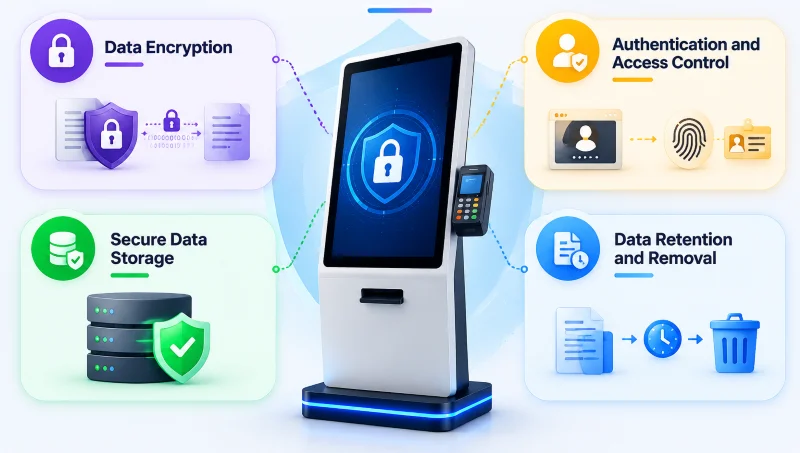
Locking down the device is only one part of kiosk security. Businesses must also protect the information passing through the app and any data stored on the device or backend systems. These security features help you protect the data:
Data Encryption
Information stored on the device and information transmitted across networks should both be encrypted. Thanks to that:
- Data at rest covers locally stored records and logs.
- Data in transit covers everything moving between the kiosk and backend systems.
Secure communication should use modern encryption protocols. Encryption doesn’t replace access controls, but it adds an extra layer of protection if someone does gain access to the device’s storage.
Authentication and Access Control
Public users and administrators should not have equivalent access levels. A customer needs to enter information and pay. An administrator needs to update software and review system logs. These roles should be clearly separated, with strong authentication protecting administrative accounts. For this:
- Role-based access control ensures that different staff levels can only access what’s relevant to their responsibilities.
- It limits the damage if any individual account is compromised.
Secure Data Storage
The kiosk shouldn’t store sensitive information unless there’s a genuine reason to. This includes:
- Payment card details
- API credentials
- Authentication tokens
- Session information
Credentials should never be hardcoded into publicly accessible applications or stored in plain text.
Data Retention and Removal
When a customer finishes their session, their information shouldn’t remain visible or accessible to whoever uses the kiosk next. Form fields, session tokens, and any locally stored customer data should be cleared automatically when a session ends. Businesses should also establish clear policies for how long data retained on backend systems is actually kept and who has access to it.
How Should Payment Security Be Handled on Kiosks?
Payment-enabled kiosks face additional requirements because of the financial data they handle. The Payment Card Industry Data Security Standard presents the framework for organisations processing payment card transactions.
Avoid Storing Cardholder Data on the Kiosk
In most kiosk environments, the app doesn’t need to directly handle or store full card details. A dedicated payment terminal can process the transaction and return an approval result to the kiosk app without sensitive card data ever passing through the kiosk software itself.
Use PCI Compliant Payment Terminals
Payment hardware should come from reputable providers with validated solutions appropriate for the intended payment environment. A custom kiosk based app should not attempt to recreate secure payment processing from scratch.
Tokenization and Encrypted Communication
Tokenization replaces sensitive payment details with a token that works within approved transaction workflows without exposing original card information to connected systems. Combined with encrypted communication, it significantly reduces payment data exposure. The specifics depend on the payment provider and transaction flow.
Separate Payment Processing Where Appropriate
Keeping payment processing separate from the main kiosk software reduces the scope of what the kiosk software itself handles. The kiosk manages product selection and order information while a dedicated terminal handles the card transaction. They communicate through a controlled integration. This separation can simplify compliance responsibilities, though it doesn’t remove all PCI DSS obligations.
Keep Payment Components Updated
Payment terminals, libraries, and supporting software should receive security updates according to provider requirements. Outdated payment components are a common source of vulnerabilities that affect both the kiosk and the customers using it.
How Do You Protect a Kiosk From Physical Tampering?
Software security has limits when someone can physically access the hardware. Kiosk enclosures should be sturdy and secured against unauthorised opening, while internal components and service connections should remain inaccessible to the public.
Practical measures include:
- Locked service compartments to restrict access to internal components.
- Tamper resistant fasteners that make unauthorized opening more difficult.
- Port covers for exposed USB ports and maintenance connections.
- Restricted maintenance access for authorised technicians only.
- Physical protection for payment terminals and card readers.
- Regular inspections to identify unexpected changes in device appearance or operation.
- Tamper detection sensors that alert administrators when the enclosure is opened, where additional monitoring is required.
Any unusual damage or unexpected payment terminal behaviour should be investigated immediately.
What Happens When a Kiosk Is Compromised?
Preparation matters here because responding to a security incident while improvising under pressure produces poor outcomes.
When a device shows signs of compromise, the first step is isolating it by restricting network access to contain any further communication with affected systems. Credentials and session tokens that may have been exposed should be reviewed and revoked. Security logs should be preserved before wiping or rebuilding the device because they help establish what happened and which systems were affected.
Depending on severity, the safest recovery path is often rebuilding the kiosk from a verified operating system image and approved configuration rather than simply restarting the app. Before returning the device to service, the vulnerability that allowed the incident should be identified and addressed. Leaving the underlying cause unresolved means other devices in the fleet remain exposed to the same risk.
Kiosk Security Checklist
Use this checklist to review the basic security controls of your kiosk system:
- OS lockdown is active, and unauthorised system access is restricted.
- Only approved applications and processes can run.
- USB ports and connected peripherals are controlled.
- Network connections are limited to required services.
- Data is encrypted during transmission and, where necessary, on local storage.
- Customer data is cleared automatically between sessions.
- PCI compliant payment components are used where applicable.
- Administrative access is protected with strong authentication and appropriate permissions.
- Security updates are tested and deployed centrally.
- Device monitoring and activity logging are enabled.
- Incident response procedures are documented and tested.
This checklist is a starting point, not a substitute for a formal security assessment.