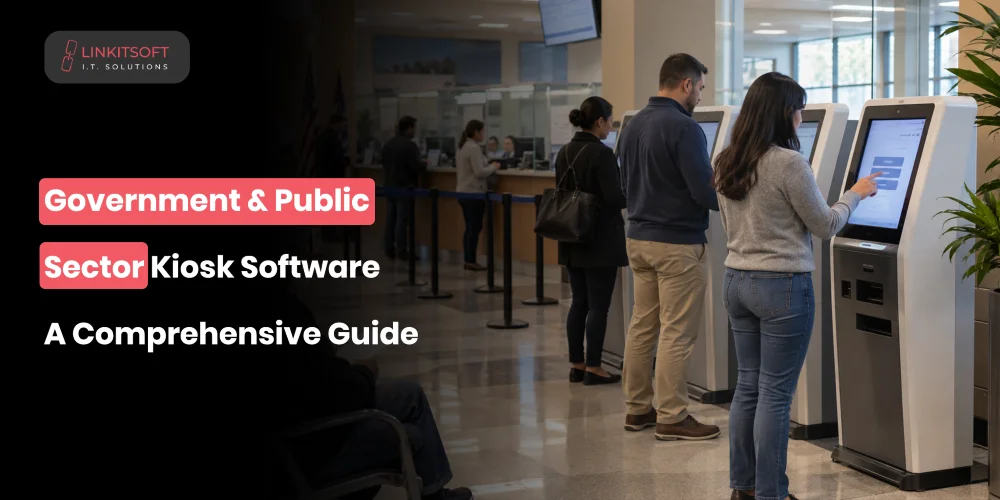
Government offices often deal with long queues for routine tasks such as certificate requests, fee payments, appointment check ins, license renewals, and application status checks. Government kiosks help move these services into a self service environment, allowing citizens to complete simple requests without waiting for staff.
However, public sector kiosks need more than a user-friendly touchscreen. They must connect securely with government systems, protect personal information, support accessibility requirements, and handle complex service workflows.
In this guide, we’ll explore what public kiosk software can do, how it integrates with existing systems, the security and management features it needs, and what organisations should consider before development.
What Is Government and Public Sector Kiosk Software?
At its core, it is a self-service application that lets citizens access official services through a dedicated kiosk. The software handles what the citizen sees and does, and it manages the connections to whatever government systems sit behind it.
Depending on the deployment, those systems might include citizen databases, identity verification services, payment platforms, appointment management tools, document management systems, and departmental back-office applications. The kiosk itself might be in a government office, a courthouse, a hospital, a library, or a transport facility. The common thread is that it provides a channel for citizens to complete approved tasks without needing a staff member to walk them through each step.
What Can Government Kiosks Actually Do?
The services available through a government kiosk depend on the department and other factors. Some kiosks handle one specific task, while others support several related services.
Citizen Identity and Verification
Most government services require some form of identity confirmation before anything can happen. A kiosk can support this through:
- Document scanning
- PIN entry
- One-time passwords
- Biometric verification
This depends on what the service requires and what the law permits. The level of verification should match the sensitivity of the service. Checking appointment times needs less than accessing personal records.
Government Service Requests
This is where most of the volume sits. In the public sector, we have:
- Application submissions
- Renewal requests
- License and permit applications
- Status checks
- Appointment bookings
The kiosk collects the required information and passes it to the relevant department. Some requests complete automatically. Others go into a review queue for a staff member to process. Either way the citizen has done their part without visiting three different counters.
Payments and Fees
The kiosk connects to a payment terminal or gateway, processes the transaction, This may include:
- Government fee collection
- Fine payments
- Service charges
- Tax payments
confirms the result to the relevant system, and issues a receipt. The software needs to handle declined payments and interrupted transactions clearly because leaving a citizen unsure whether they were charged is a support problem that costs more to resolve than getting the failure state right in the first place.
Forms and Document Handling
Kiosks can reduce a significant amount of paper handling for both citizens and government offices. It can digitally handle:
- Digital form completion
- Document scanning
- File uploads
- Certificate printing
- Receipt printing
Documents containing personal information should not sit on the device after the session ends.
How Does Government Kiosk Software Connect to Existing Systems?
A government kiosk needs access to accurate information and approved workflows. Without reliable integrations, citizens may still need staff assistance for every step.
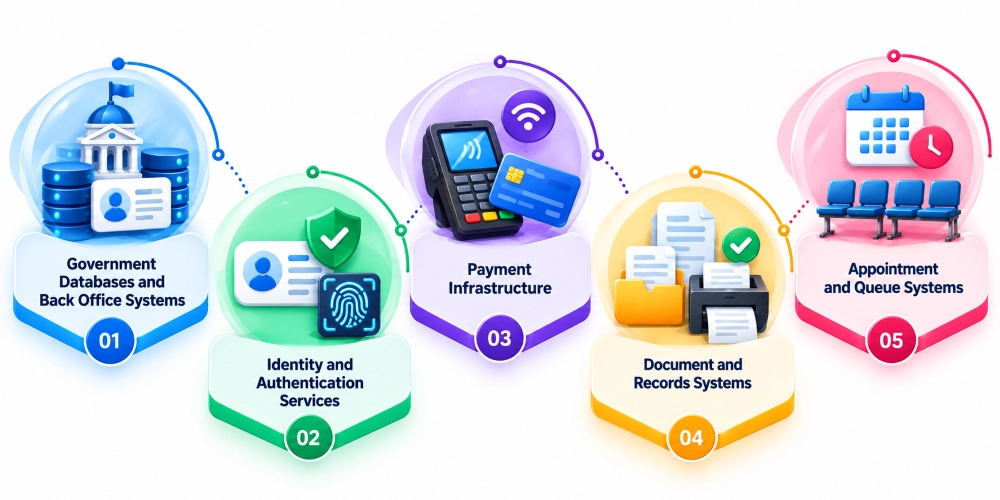
Government Databases and Back Office Systems
The kiosk retrieves citizen records, checks eligibility, submits applications, and updates service status through secure API connections to government databases and departmental systems. It should only access the data the current service actually requires.
Identity and Authentication Services
Authentication happens before the kiosk shows sensitive information or allows restricted actions. The software connects to approved identity providers, national identity platforms, or biometric systems depending on what the department uses and what the legal framework requires.
Payment Infrastructure
Payment terminals, government payment platforms, card gateways, and digital wallets where supported. The integration needs to cover the full transaction lifecycle including failures, confirmation of payment status, and updating the relevant records once payment is confirmed.
Document and Records Systems
When a citizen requests an official document, the kiosk connects to the relevant records system to verify availability and retrieve or print the document. Permission controls and document validation need to be part of this integration, not assumed.
Appointment and Queue Systems
Checking in on arrival, confirming appointments, receiving queue numbers, checking service progress. In busy public offices, this can meaningfully reduce the administrative back and forth that happens when a citizen arrives, and staff have to manually locate their booking.
What Makes Government Kiosk Software Different From Standard Kiosk Software?
A government kiosk may look similar to a retail or hospitality kiosk, but the underlying requirements are often more demanding.
Complex Service Workflows
Government processes involve multiple steps. Due to this, there are eligibility conditions, validations, and sometimes approvals across different departments. It might need to check three different conditions before allowing a request to proceed, then route it to different departments based on the outcome. The error handling for this complexity needs to be clear to the citizen at every step.
Strict Access and Data Controls
Citizens, maintenance staff, and support teams all need different levels of access. The public interface should never expose administrative functions. Role-based permissions need to be designed into the system from the beginning.
Accessibility Requirements
Government services are for everyone. This means special care for:
- Screen reader compatibility
- Clear navigation
- Accessible input methods
- Appropriate screen height
- Audio guidance
- Multiple language support
They affect which citizens can actually use the kiosk and in some jurisdictions they are legal requirements.
Auditability
Government organisations need records of what happened. Transaction logs, authentication events, application submissions, administrative changes, system errors. These records support accountability, troubleshooting, and compliance. They need to be protected from modification and retained according to applicable policies.
How Do You Secure Public Sector Kiosks?
Public kiosks operate in environments where anyone may approach the device. At the same time, they may connect with sensitive government systems. Security therefore needs to be strong.
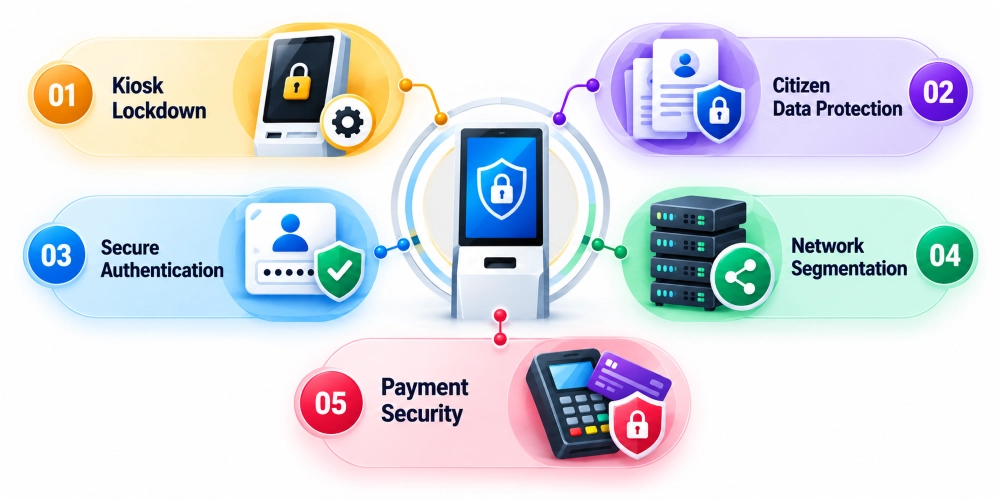
Kiosk Lockdown
Running the app in fullscreen is not a security measure. Proper lockdown prevents access to the operating system, service ports, and external devices. The kiosk should run exactly what it is supposed to run and nothing else.
Citizen Data Protection
Things like minimal local data retention and session data should be cleared after each interaction. The next person who walks up to the kiosk should see nothing from the previous session.
Secure Authentication
Authentication controls should match the sensitivity of the services being offered. These may include limits on failed login attempts and stronger verification methods where required. Administrative access must remain completely separate from the public interface.
Network Segmentation
The kiosk should communicate only with approved services and endpoints. Unrestricted access to government networks from a public-facing device is an unnecessary risk. Network monitoring should flag unusual traffic patterns.
Payment Security
PCI-compliant payment hardware, no local cardholder data storage, physical protection of payment terminals. Tampered terminals are a documented risk in public environments and should be checked regularly.
How Are Government Kiosks Managed Across Multiple Locations?
Managing one kiosk is different from managing hundreds of devices across different offices or cities. Public sector organisations need central tools to monitor performance and respond to problems without sending technicians to every location.
Centralised Device Management
A management platform that shows kiosk health, connectivity, app status, and hardware component status across all locations. Support teams need to see problems before citizens encounter them.
Remote Configuration and Software Deployment
Service changes and security fixes should be deployed remotely through a controlled process. Testing before release is especially important when kiosks support essential public services. The system should also automatically confirm whether each update was installed successfully or not.
Monitoring and Alerts
Events like a kiosk going offline or a connected service becoming unreachable should trigger alerts rather than being discovered by a citizen trying to use the kiosk. The faster the response, the smaller the service disruption.
Audit and Reporting
Reports like usage volumes and service failures help departments understand what is working and where improvements are needed. It helps them decide whether the kiosk is actually reducing the load on staff or creating new problems.
What Should You Consider Before Developing a Government Kiosk?
Here are the necessary aspects that you should consider:
Define the services clearly before development starts. Each service needs documented steps, required information, validation rules, possible failure states, and what happens to incomplete requests. Discovering these mid-development is expensive.
Identify existing system integrations early. Government databases and legacy systems sometimes need middleware or custom development to expose data in a way a kiosk can use. Finding this out during scoping is significantly less painful than finding it during build.
Establish security and compliance requirements upfront. Data protection obligations, authentication standards, audit logging requirements, payment security, retention policies. These shape the architecture and cannot be bolted on at the end.
Select hardware based on the actual use case and environment. A document printing kiosk has different requirements from a biometric identity verification terminal. Outdoor or high-traffic installations need different physical protection from a supervised government office.
Plan for remote operations from the beginning. Who monitors the kiosks, who responds to alerts, who handles hardware faults, who deploys updates. These responsibilities need to be assigned before go-live, not after the first incident.