
Most small businesses do not buy kiosk hardware anymore. They just buy an iPad and download an app. All they have to do after this is set it up and bolt the whole thing to a counter. That might sound like saving up on things like money and effort, but it is actually a smarter approach than it gets credit for.
Custom kiosk hardware is expensive and difficult to update. iPads are none of those things. They are widely available, and when the right software is running on them, they perform the same functions as whole terminals at a fraction of the cost.
This guide covers how iPad kiosk software actually differs from traditional kiosk systems and the best software options for businesses to choose from.
How Does iPad Kiosk Software Differ from Regular Kiosk Software?
Kiosk software may seem similar across all devices. However, the reality is a little different. iPad kiosk software is built specifically around Apple’s ecosystem and device management framework.
Traditional kiosk systems are often developed for Windows or Android. Sometimes, even for custom hardware terminals. These systems usually provide deeper hardware level customization, but they also require more technical setup and infrastructure management.
iPad kiosk software focuses more on simplicity and centralized control.
- One major advantage of iPad kiosks is how quickly they can be deployed. Businesses can set up a fully functional kiosk in just a few minutes using kiosk mode or mobile device management solutions.
- The overall user experience is also very different. iPads are known for their smooth touchscreen response and clean interface design, making interactions faster and more intuitive for customers.
- Security is handled in a smoother way compared to traditional kiosk systems. Apple uses features like Guided Access and MDM controls to keep the device locked into specific apps or workflows.
- Traditional kiosks are usually built with industrial grade displays designed for constant public use, whereas iPads are consumer devices adapted for commercial purposes.
The use cases can overlap, but iPad kiosk software is especially popular in industries that prioritize aesthetics and cloud management.
What are the Best iPad Kiosk Softwares in 2026?
The iPad kiosk software market has expanded rapidly over the last few years. Some platforms focus heavily on device management and enterprise security, while others are designed for retail operations, visitor management, or self ordering systems.
The best choice usually depends on the type of workflow a business needs to support.

1. MobileIron
MobileIron remains one of the strongest enterprise focused iPad kiosk management solutions available in 2026. It is widely used by organizations that need strict security policies and remote management capabilities across large device fleets. The platform supports things like:
- Kiosk mode deployment
- Remote configuration
- App management
- Compliance enforcement
- Secure content delivery
Businesses that are operating hundreds or thousands of iPads often prefer MobileIron because it simplifies device monitoring across multiple locations.
2. Workspace ONE
Workspace ONE is another enterprise grade platform designed for advanced endpoint management. It combines things into one dashborad, such as:
- Kiosk management
- Identity security
- Remote administration
- Analytics
- App deployment
The platform supports both single app and multi app kiosk configurations on iPads. Businesses can remotely configure devices and troubleshoot systems without requiring IT teams to be present on the site.
3. The Receptionist
The Receptionist is designed specifically for visitor management and front desk automation. Instead of functioning as a general kiosk management platform, it focuses on making check ins easier and helps keep track of visitors. To do this, it sends notifications and reception workflows.
The software transforms an iPad into a digital receptionist that can automatically handle:
- Guest registration
- Badge printing
- Visitor logs
- Host notifications
It is commonly used in offices and clinics, where managing visitors quickly and timely matters.
4. SwipedOn
SwipedOn focuses on workplace visitor management and employee check in systems. It is widely used in warehouses and facilities with ongoing operations where visitor tracking and workplace safety are important. The platform supports things like:
- Contactless sign ins
- Health questionnaires
- Visitor notifications
- Emergency roll calls
- Employee attendance tracking
The setup process is relatively straightforward, which makes it attractive for businesses that want a functional kiosk system without extensive technical deployment.
5. Epos Now
Epos Now is primarily known as a cloud based POS platform, but its iPad kiosk capabilities have become increasingly popular. This can be seen in retail and hospitality environments. The system supports:
- Self ordering
- Payment processing
- Inventory management
- Sales tracking through iPad terminals
Restaurants and retail businesses often use Epos Now because it combines customer interaction tools with backend management. Staff can monitor transactions and sales performance from a unified dashboard.
6. Kiosk Pro
Kiosk Pro is one of the most recognizable iPad specific kiosk apps available today. It is designed specifically to lock iPads into secure kiosk experiences for public or business use. The platform supports things like:
- Website kiosks
- Interactive displays
- Digital catalogs
- Self service portals
- Surveys
- Information stations
Businesses can configure browsing restrictions and user session settings without needing advanced technical expertise.
7. Shopify POS
Shopify POS has become a strong option for businesses looking to turn iPads into retail kiosks or mobile checkout systems. The platform combines all operations inside one ecosystem, which will include:
- Inventory management
- Payments
- Order synchronization
- Customer profiles
- Omnichannel retail
Retailers benefit from real time synchronization between physical stores and ecommerce operations. Products and customer data remain connected across all channels.
For smaller retailers and growing brands, Shopify POS offers a relatively accessible entry point into iPad kiosk enabled retail experiences.
8. Miradore MDM
Miradore is a mobile device management platform focused on remote control, security enforcement, and device lifecycle management. It supports iPad kiosk deployment by allowing administrators to:
- Configure restrictions
- Manage apps
- Monitor devices
- Apply security policies remotely
Businesses that want lightweight but effective MDM functionality often choose Miradore because it balances usability with strong management capabilities.
9. HAkiosk
HAkiosk focuses on secure kiosk lockdown and browser control functionality for business environments.
The platform enables organizations to:
- Restrict access
- Control navigation
- Manage sessions
- Lock iPads into dedicated workflows
It is commonly used for surveys, customer feedback systems, self ordering interfaces, and information displays.
Its lightweight structure makes deployment relatively fast, especially for businesses that primarily need browser based kiosk functionality instead of full enterprise device management.
10. Flipdish
Flipdish is heavily focused on restaurant self ordering and food service kiosk systems. The platform allows restaurants to turn iPads into ordering terminals that support:
- Menu browsing
- Payment processing
- Upselling
- Order management
Self ordering kiosks continue to grow rapidly in food service environments because they improve operations and often increase order values.
What Challenges Can you face while using iPad Kiosk Software?
While iPad kiosk systems offer major advantages in usability and deployment speed, businesses still face several technical challenges while using them, and it’s only natural. Ignoring these issues early can create reliability problems later.
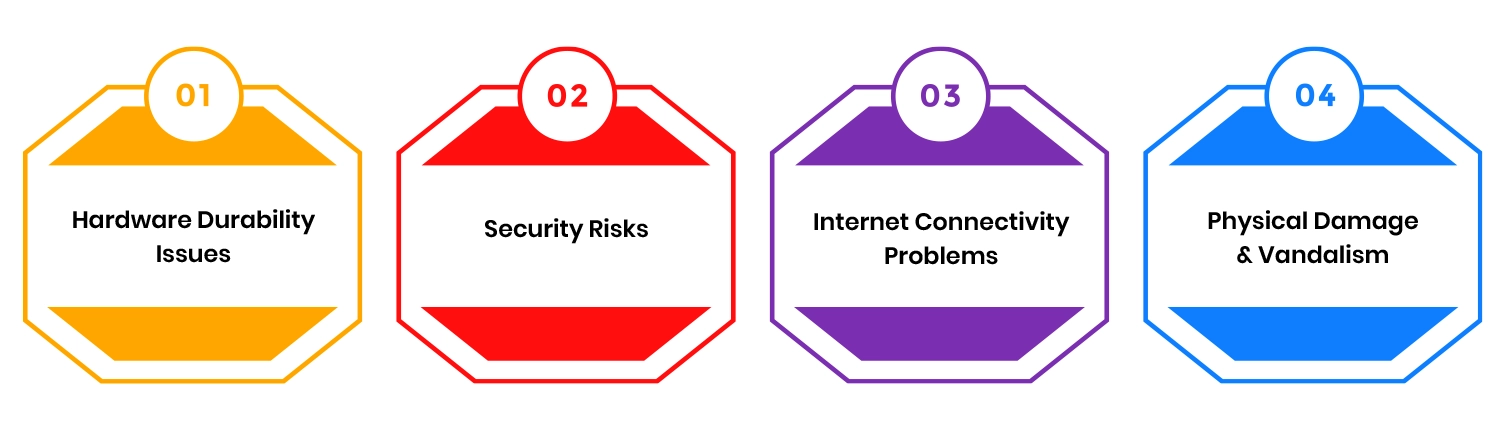
Hardware Durability Issues
iPads were originally designed as consumer devices, not industrial hardware terminals. In high traffic public environments, this creates durability concerns over time.
Constant touchscreen interaction and constant environmental exposure can gradually affect the hardware’s reliability. Screens may wear down, and mounting systems may loosen after extended usage.
Security Risks
Any publicly accessible device introduces security concerns.
Without proper configuration, users may attempt to exit kiosk mode and access unauthorized apps. Even kids can get into these things and manipulate settings or interfere with device functionality.
Businesses also need to protect customer information and operational systems from unauthorized access. This is why strong mobile device management policies matter.
Internet Connectivity Problems
Many kiosk systems rely heavily on cloud synchronization and real time updates.
When internet connectivity becomes unstable, the kiosk experience can quickly deteriorate. Transactions may fail, and synchronization delays can interrupt operations.
Physical Damage & Vandalism
Public facing kiosks are exposed to accidental damage and intentional misuse.
Devices placed in open environments may experience cracked screens or vandalism attempts. This becomes even more important in transportation hubs and unattended retail locations.
Protective kiosk enclosures help reduce these risks, but businesses still need monitoring and maintenance strategies for long term deployment.
Conclusion
iPad kiosk software has evolved far beyond simple screen locking tools. In 2026, these platforms are the technology that is leading many small retail checkout systems and interactive customer experiences across multiple industries.
As self service adoption continues growing worldwide, businesses using flexible and well managed kiosk systems will be in a much stronger position to deliver faster service and support modern customer expectations.