Managing a few self-service kiosks is straightforward until devices are installed across multiple locations. A disconnected terminal, printer failure, or application crash can interrupt service without the operations team knowing immediately.
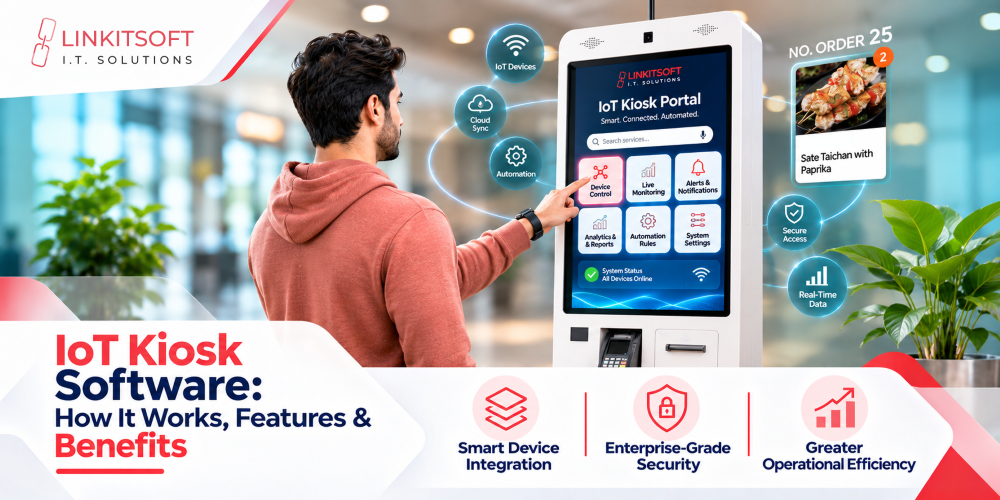
IoT kiosk software addresses this challenge by connecting supported kiosks to monitoring and management systems. It enables organizations to collect device information, identify faults, and perform eligible administrative tasks remotely.
From retail checkouts to smart vending machines, connected kiosk software helps businesses manage distributed devices. This guide explains its features, architecture, security, applications, and selection criteria.
What Is IoT Kiosk Software?
IoT kiosk software connects self-service terminals with backend platforms to support device monitoring, telemetry collection, remote configuration, and management.
Unlike standalone kiosk applications, IoT-enabled systems can report operational information such as connectivity, application status, and supported hardware faults.
How Is IoT Kiosk Software Different From Traditional Kiosk Software?
Traditional kiosk software primarily manages local user interactions and application functions. IoT kiosk software adds connected monitoring, device communication, and remote management capabilities.
However, internet connectivity alone does not make a kiosk fully IoT-enabled. Hardware telemetry and remote controls require appropriate software, permissions, and device interfaces.
How Does IoT Kiosk Software Work?
IoT kiosk software connects device operations with a management platform through a structured communication process.
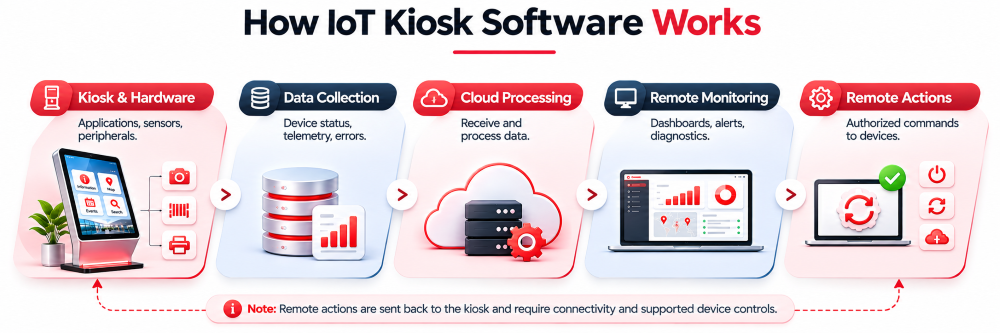
- Data Collection: The application or device agent collects supported operational information.
- Data Transmission: Device information travels to backend services through a protected connection.
- Data Processing: The platform records status, events, and reported errors.
- Remote Monitoring: Administrators review information through dashboards and alerts.
- Remote Actions: Authorized commands are sent to supported devices when required.
The available functions depend on the kiosk’s hardware, network, and software configuration.
Read More Related Blogs
How Do IoT Kiosks Communicate With Cloud Platforms?
Connected kiosks can communicate using protocols such as MQTT or HTTPS, depending on system requirements.
MQTT supports publish-and-subscribe messaging, while HTTPS can support API requests and data exchange.
Device authentication, communication security, acknowledgments, and reconnection handling are essential considerations in either approach.
What Are the Key Features of IoT Kiosk Software?
IoT kiosk software combines device monitoring, security, hardware connectivity, and centralized management to support distributed self-service operations.
Real-Time Device Monitoring and Telemetry
Monitoring platforms collect available information about connectivity, system resources, application health, and supported hardware conditions to provide operational visibility.
Multi-Layer Kiosk Lockdown and Session Security
OS lockdown restricts unauthorized application and system access. Session controls help clear user-specific information and prepare devices for subsequent interactions.
Remote Hardware and Peripheral Diagnostics
Supported device interfaces enable monitoring of connected printers, scanners, sensors, and other peripherals to identify reported faults and operational errors.
Automated Fault Alerts and Notifications
Monitoring rules can generate alerts for detected disconnections, application failures, hardware errors, and other supported events requiring attention.
Remote Configuration and Device Control
Authorized administrators can manage eligible device settings and perform supported actions, including application restarts, configuration updates, and remote troubleshooting.
Over-the-Air Software Updates
OTA capabilities allow administrators to distribute compatible software updates remotely, monitor deployment status, and manage recovery procedures where supported.
Offline Functionality and Data Synchronization
Locally stored information supports selected kiosk functions during network interruptions. Eligible data can synchronize when the connection becomes available again.
Centralized Fleet Management
Management dashboards organize kiosks by location, device type, or configuration, allowing administrators to oversee distributed installations more efficiently.
Digital Signage and Idle-Screen Integration
Compatible kiosk applications can display announcements, information, or promotional content during idle periods and return to interactive functions when required.
What Are the Main Components of IoT Kiosk Architecture?
A reliable custom kiosk architecture connects local applications, hardware interfaces, communication services, cloud systems, and administrative tools.
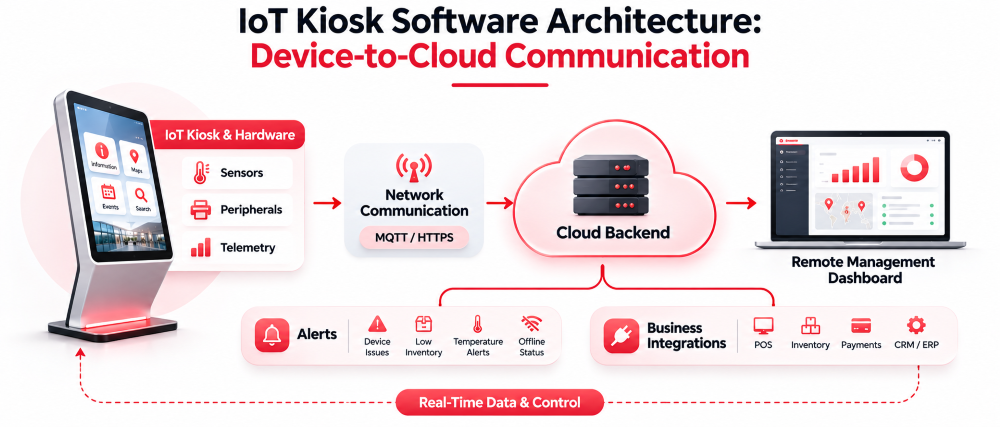
Kiosk Application and Edge Software
The application manages customer interactions, while local software or device agents handle supported hardware communication, telemetry, and offline processing.
Sensors, Controllers, and Peripherals
Supported scanners, printers, sensors, and controllers exchange operational information through compatible drivers, SDKs, or device communication interfaces.
Network and Communication Layer
The communication layer manages device connectivity, protected data transmission, authentication, and reconnection behavior between kiosks and backend services.
Cloud Backend and Device Registry
Backend systems maintain device identities, configurations, permissions, and information needed to administer connected kiosk installations.
Telemetry Processing and Data Storage
The platform processes reported status, operational logs, and device events for monitoring, diagnostics, reporting, and historical analysis.
Remote Fleet Management Dashboard
Administrative dashboards display device information, alerts, configurations, software versions, and management controls across connected locations.
How Does Remote IoT Kiosk Management Work?
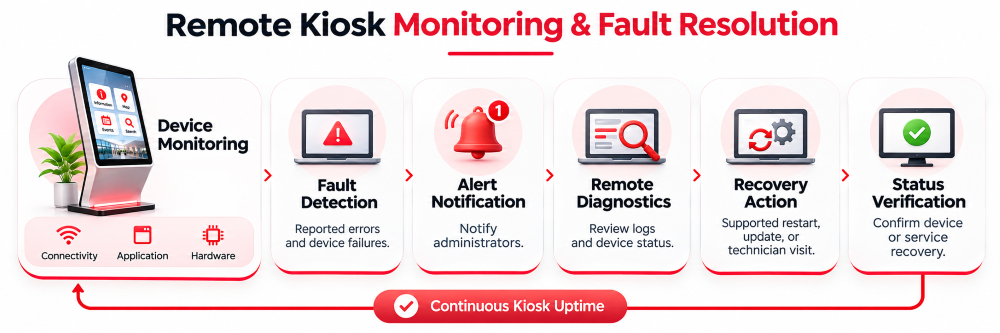
Remote fleet management helps operations teams oversee connected kiosks without requiring physical access for every routine task.
Device Registration and Identification
Each kiosk receives an identifiable device record, allowing administrators to associate it with a location, configuration, and authorized management functions.
Online and Offline Status Monitoring
Platforms monitor device connectivity and available application health information. An online device does not necessarily mean every peripheral or customer workflow is functioning.
Peripheral Fault Detection
Supported hardware may report printer errors, scanner disconnections, sensor faults, or other conditions through its driver or device interface.
Remote Troubleshooting and Recovery
Administrators can review diagnostic information and perform eligible actions, such as refreshing configurations or restarting an application, depending on device support.
Multi-Location Device Management
Organizations can group kiosks by location or operating requirements to coordinate configurations, monitor devices, and deploy compatible updates.
How Can Businesses Secure IoT Kiosk Software?
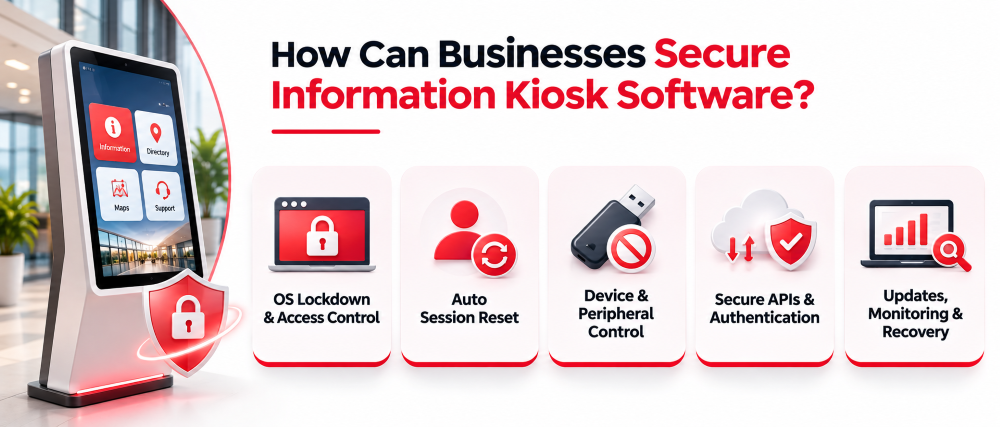
Connected kiosks require protection at the device, application, communication, and management levels.
Device Authentication and Identity Management
Unique device identities and authentication controls help restrict backend access to authorized kiosks and management services.
Encrypted Communication and Data Protection
Protected network connections, secure credential handling, and suitable data storage controls reduce exposure of sensitive information.
OS Lockdown and Access Controls
OS lockdown limits public access to operating system settings, unauthorized applications, and restricted device functions.
Secure Software and Firmware Updates
Update mechanisms should verify software integrity, restrict deployment permissions, and provide suitable recovery procedures for unsuccessful installations.
Audit Logs and Remote Command Authorization
Administrative actions should follow appropriate permissions and generate records that support security reviews and troubleshooting.
The NIST IoT Device Cybersecurity Capability Core Baseline provides relevant guidance on device identification, configuration, data protection, access controls, and software updates.
What Hardware Can IoT Kiosk Software Integrate With?
IoT kiosk applications can communicate with different device components when compatible interfaces are available.
- Touchscreens and Computing Boards: Customer interaction and application processing.
- Barcode and QR Scanners: Product, ticket, or identification scanning.
- Printers and RFID/NFC Readers: Printing and supported identification workflows.
- Payment Terminals: Connected payment operations through approved integrations.
- Sensors and Controllers: Supported environmental, equipment, or machine-status reporting.
Actual integration capabilities depend on the hardware, operating system, SDKs, drivers, and permissions.
Which Industries Use IoT Kiosk Software?
IoT kiosk software supports connected self-service devices in industries where remote operations and device visibility are important.
Retail and Self-Checkout
Retail businesses can monitor kiosk connectivity, supported peripherals, application status, and integrations with checkout systems.
Smart Vending Machines
Connected vending systems may report available inventory information, machine faults, transaction events, and device connectivity when supported by the hardware.
Healthcare and Patient Check-In
Healthcare facilities can manage connected check-in devices, monitor application health, and support approved registration-system integrations.
Transportation and Ticketing
Ticketing kiosks may provide remote printer diagnostics, application monitoring, configuration management, and software deployment.
Hospitality and Visitor Management
Hotels and visitor facilities can use connected kiosks for guest-facing applications, content management, operational monitoring, and supported system integrations.
Smart Lockers and Automated Service Terminals
Connected lockers and service terminals may support controller communication, operational alerts, device monitoring, and authorized remote administration.
What Are the Benefits of IoT Kiosk Software?
IoT kiosk software offers several operational advantages when supported by the deployed system.
- Remote Visibility: Monitor connected kiosk status and device information.
- Faster Fault Detection: Identify reported errors through monitoring and alerts.
- Centralized Updates: Manage eligible configurations and software remotely.
- Reduced On-Site Intervention: Handle supported troubleshooting tasks without technician visits.
- Operational Insights: Analyze device events, errors, and performance trends.
- Fleet Management: Oversee distributed kiosks through a centralized platform.
Actual time and cost savings depend on implementation, device reliability, support procedures, and operational conditions.
What Challenges Should Businesses Consider When Deploying IoT Kiosks?
IoT kiosk deployments require careful planning around hardware, connectivity, security, and ongoing maintenance.
Network Connectivity and Offline Limitations
Remote monitoring and commands depend on network availability. Local functionality requires appropriate offline design and synchronization controls.
Hardware and SDK Compatibility
Unsupported peripherals, outdated drivers, or restricted device interfaces can limit monitoring, integration, and remote control capabilities.
IoT Security and Credential Management
Connected devices need protected credentials, controlled access, secure communications, and procedures for managing compromised or outdated configurations.
Telemetry Reliability and Alert Accuracy
Incomplete hardware data, delayed messages, and poorly configured alerts can create misleading operational information.
Software Updates and Recovery
Updates should be tested for device compatibility and include recovery procedures to address failed installations or interrupted deployments.
Fleet Scalability and Maintenance
Larger deployments require organized device records, reliable monitoring infrastructure, consistent configurations, and defined support responsibilities.
Custom vs. Off-the-Shelf IoT Kiosk Software: Which Should You Choose?
Both approaches offer advantages depending on the required functionality, existing hardware, and deployment needs.
| Factor | Off-the-Shelf | Custom Software |
| Device Support | Vendor-supported hardware | Targeted compatibility |
| Monitoring | Available telemetry | Custom monitoring requirements |
| Integrations | Existing APIs and connectors | Business-specific integrations |
| Security | Vendor-supported controls | Requirement-based implementation |
| Deployment | Often faster | Requires development |
| Costs | Licensing and maintenance | Development and support |
Off-the-shelf platforms can suit standard device-management requirements. Custom software is worth considering for specialized hardware, telemetry, integrations, or workflows.
How Much Does IoT Kiosk Software Cost?
IoT kiosk software costs depend on technical requirements, device compatibility, deployment scale, and ongoing services.
The main cost factors include:https://linkitsoft.com/
- Software: Licensing or custom application development.
- Hardware: Device interfaces, controllers, and peripherals.
- Connectivity: Network services and communication infrastructure.
- Cloud Services: Backend hosting, telemetry processing, and storage.
- Security: Authentication, access controls, and testing.
- Maintenance: Monitoring, updates, troubleshooting, and support.
A project-specific assessment is necessary to establish accurate costs.
How Do You Choose the Right IoT Kiosk Software?
Choosing IoT kiosk software requires evaluating device requirements, monitoring capabilities, security, integrations, and long-term support.
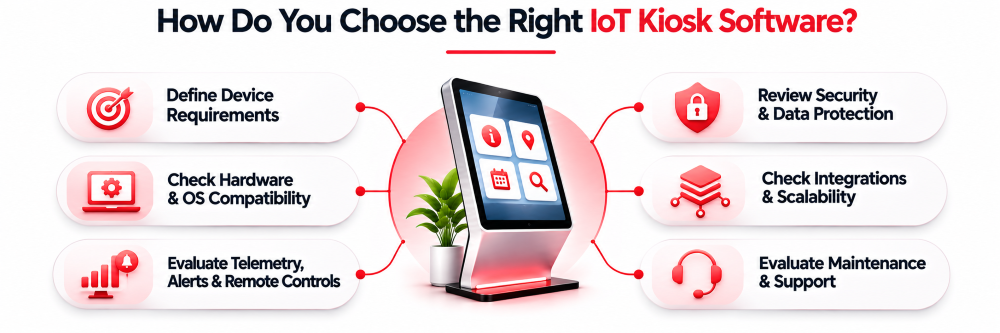
Define Your Connected Device Requirements
Identify required device information, supported remote actions, operational workflows, and deployment objectives.
Verify Hardware and Operating System Compatibility
Check device specifications, operating system versions, drivers, SDKs, and supported peripheral interfaces.
Evaluate Telemetry, Alerts, and Remote Controls
Review available device metrics, fault reporting, notification rules, diagnostic information, and authorized remote commands.
Review Device Security and Data Protection
Assess authentication, OS lockdown, encrypted communication, access permissions, update security, and audit logging.
Assess Backend Integrations and Scalability
Check compatibility with business systems, APIs, existing infrastructure, and the expected number of connected devices.
Evaluate Long-Term Maintenance and Support
Review software updates, monitoring, recovery procedures, technical support, and maintenance responsibilities.
Why Choose Linkitsoft for IoT Kiosk Software Development?
Linkitsoft develops custom kiosk applications with supported hardware integrations, backend connectivity, and centralized management.
- Custom Architecture: Tailored kiosk applications and business workflows.
- Hardware Integration: Compatible peripherals, controllers, and devices.
- Remote Monitoring: Connectivity, application status, and diagnostics.
- Centralized Management: Device configurations and supported updates.
- System Integration: APIs, databases, and enterprise platforms.
- End-to-End Services: Design, development, testing, and maintenance.
What Real-World Connected Kiosk Projects Has Linkitsoft Developed?
Linkitsoft’s published work demonstrates experience developing connected kiosk applications and integrating business systems.