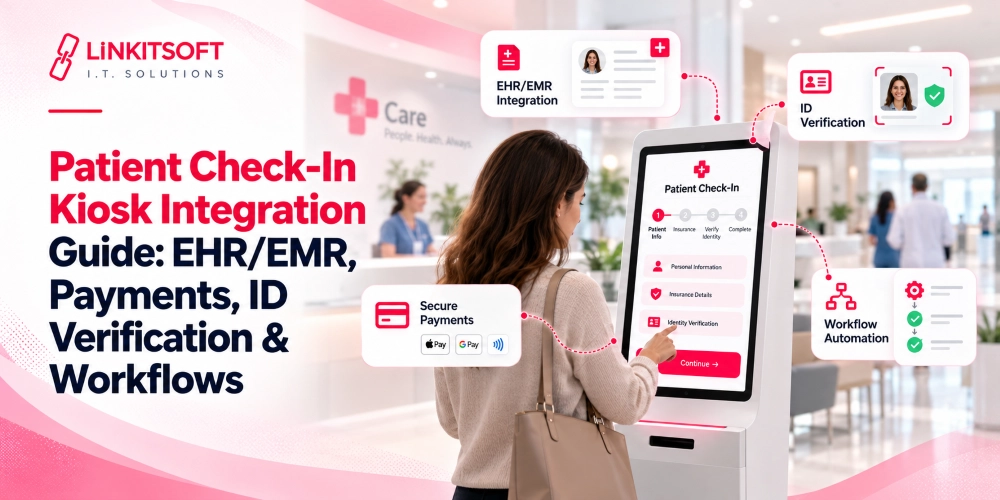
Long waiting lines, manual registration, and repeated paperwork can slow down patient check-in and overwhelm front-desk staff. Self-service kiosks help streamline these tasks, but without proper integration, patient records, appointments, and payments may remain disconnected.
Patient check-in kiosk integration connects kiosks with EHR/EMR systems, payment processing, and identity verification tools to support a smoother registration process.
This guide explains how these integrations work and how healthcare facilities can build secure, reliable patient check-in workflows.
How Does Patient Check-In Kiosk Integration Work?
Patient check-in kiosk integration connects a self-service kiosk with the healthcare systems responsible for patient registration, appointment scheduling, billing, and record management.
Through secure APIs or supported healthcare interoperability standards, the kiosk retrieves patient information, processes required steps, and sends completed check-in updates back to the relevant systems.
Instead of operating as a standalone registration terminal, the kiosk becomes part of the healthcare facility’s existing administrative workflow.
For example, a patient arriving for an appointment may use the kiosk to:
- Find their scheduled appointment.
- Verify their identity and personal details.
- Review or update registration information.
- Confirm insurance information.
- Pay an applicable copay.
- Complete check-in and receive confirmation.
Behind the scenes, the software communicates with the appropriate healthcare applications to validate and record these actions.
An integration layer may connect the kiosk to several systems:
| Connected system | Role in patient check-in |
| EHR/EMR | Accesses permitted patient information and relevant records |
| Practice Management System (PMS) | Manages appointments, registration, and administrative workflows |
| Payment Processor | Handles copays and other supported transactions |
| Identity Verification System | Helps confirm that the correct patient is checking in |
| Insurance or Eligibility Service | Retrieves or validates available coverage information |
Not every healthcare organization uses separate platforms for these functions. Some EHR solutions include scheduling and billing modules, while others depend on external applications.
The integration architecture should reflect how the organization’s systems actually work.
How to Integrate Patient Check-In Kiosks With EHR/EMR Systems
EHR/EMR integration is one of the most important technical parts of developing patient self check-in kiosk software.
The kiosk needs access to the information required for registration without exposing unrelated or unnecessary medical records. It must also send updates to the correct destination.
Connecting Kiosks Through EHR/EMR APIs
An application programming interface (API) allows the kiosk’s backend to exchange information with a healthcare platform. For instance, when a patient enters an appointment code, the kiosk may send a request through a secure backend service to locate the corresponding appointment.
The healthcare platform returns the permitted information needed to continue check-in. Once the patient completes the process, the integration service sends the relevant updates back.
A typical API integration includes:
- Patient lookup: Finding the correct patient record using approved identifiers.
- Appointment retrieval: Displaying eligible appointments for the current visit.
- Demographic updates: Submitting reviewed or corrected registration details.
- Check-in confirmation: Updating the appointment or arrival status.
- Error handling: Managing unsuccessful requests without creating duplicate records.
The available functions depend on the EHR vendor’s API capabilities, permissions, and integration agreements.
Some platforms support direct API access. Others require vendor-specific interfaces or middleware to connect external systems.
Using HL7 and FHIR for Healthcare Data Exchange
Healthcare systems often use interoperability standards to exchange patient and administrative information.
Two important technologies are HL7 messaging and FHIR (Fast Healthcare Interoperability Resources).
HL7 v2 messaging is commonly used for exchanging administrative and clinical events between healthcare applications. Depending on the connected systems, messages may communicate registration changes or patient arrival information.
FHIR provides a resource-based approach to healthcare data exchange and supports RESTful API interactions.
Relevant FHIR resources can include:
| FHIR resource | Integration purpose |
| Patient | Represents patient demographic and identifying information |
| Appointment | Represents scheduled healthcare appointments |
| Encounter | Represents an interaction involving healthcare services |
| Coverage | Represents relevant insurance coverage information |
FHIR resources serve different purposes: Appointment represents a scheduled visit, while Encounter records an actual healthcare interaction. Patient arrival does not automatically start an encounter, so kiosks must update the correct status. EHR compatibility, API permissions, and supported FHIR operations should also be verified before integration.
Synchronizing Patient Records and Appointment Status
Accurate synchronization prevents confusion between the kiosk and the front desk. Consider a patient who checks in successfully at a kiosk, but their appointment still appears as pending in the practice management system.
Staff may assume the patient has not arrived, even though the self-service process is complete. To prevent this, the integration should define how the kiosk communicates completed actions and receives confirmation.
Important considerations include:
- Matching the patient to the correct existing record.
- Preventing accidental duplicate registrations.
- Checking whether an appointment has already been completed or canceled.
- Recording updates only after the receiving system confirms them.
- Handling duplicate requests and temporary connection failures.
- Keeping the displayed check-in result consistent with the backend status.
Reliable synchronization is not simply about sending information. The kiosk must also know whether the healthcare system accepted the update.
Integrating Payment Processing Into Patient Check-In Kiosks
Healthcare facilities may collect copays, deposits, or eligible outstanding balances during check-in. By connecting payment processing with the registration workflow, patients can complete applicable payments without visiting a separate billing counter.
However, the kiosk must obtain the correct payable amount and communicate the transaction outcome to the appropriate billing system.
Collecting Copays and Outstanding Balances
Patient check-in kiosk payment integration generally begins with the billing or practice management system.
When a patient verifies their appointment, the kiosk may request information about any amount due at check-in.
If the connected system supports this functionality, the kiosk can:
- Retrieve the amount the patient is expected to pay.
- Display the payment details for review.
- Allow the patient to select an available payment method.
- Initiate a transaction through the connected payment processor.
- Display the confirmed transaction result.
- Send the payment reference to the billing system.
The amount presented should come from an authorized billing source rather than an estimate calculated independently by the kiosk.
Some facilities may also allow patients to skip payment or request staff assistance, depending on their policies.
Connecting Payment Terminals and Billing Systems
Healthcare kiosks connect with card terminals and payment gateways to securely process patient payments. Once approved, transaction details are synchronized with the billing system.
If synchronization fails, the system should retain transaction records to prevent duplicate charges. Payment integrations must also follow applicable PCI DSS security requirements to protect sensitive payment data.
Patient Identity Verification and Insurance Information
Patient identity verification helps ensure that the kiosk retrieves and updates the correct record.
This becomes especially important when patients share similar names or when multiple people have appointments at the same facility.
Verifying Patient Identity at the Kiosk
The appropriate verification method depends on the healthcare setting, the information being accessed, and the organization’s security requirements.
Common approaches include:
- Appointment codes: Patients enter a unique code associated with their scheduled visit.
- QR code scanning: Patients scan a code provided during appointment confirmation.
- Demographic verification: Patients confirm approved identifying information against existing records.
- ID scanning: Supported devices capture identity document information when the workflow requires it.
Patient names alone may not provide sufficient identity verification. Kiosks should balance security and ease of use while protecting sensitive information. If verification fails or records don’t match, patients should be directed to staff for assistance.
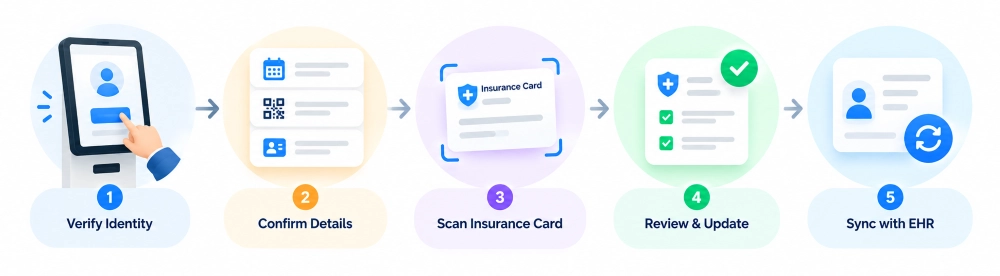
Capturing and Updating Insurance Details
Patient check-in kiosks allow patients to review, update, and scan insurance cards during registration. The captured details can be synchronized with connected healthcare systems.
However, insurance card scanning differs from eligibility verification, which requires communication with a payer or eligibility service. This integration helps identify insurance issues before appointments and keeps patient records accurate.
Step-by-Step Patient Check-In Kiosk Workflow
A well-designed patient check-in kiosk workflow should guide patients through registration while keeping every completed action connected to the appropriate healthcare system.
The exact process varies between hospitals, clinics, and outpatient facilities, but a typical workflow follows these stages.
Step 1: Patient Starts Check-In
The patient approaches the kiosk and selects the check-in option. The interface provides clear instructions to begin the registration process.
Patients can identify themselves through available methods, such as:
- Scanning an appointment QR code.
- Entering an appointment or registration code.
- Providing approved identification details.
Step 2: The Kiosk Retrieves the Appointment
The kiosk sends the patient’s information to the connected scheduling system through a secure backend integration.
The system then:
- Searches for the patient’s scheduled appointment.
- Retrieves relevant appointment details.
- Checks whether the appointment is eligible for check-in.
If no matching appointment is found, the kiosk directs the patient to front-desk assistance.
Step 3: Patient Information Is Verified
Once the appointment is identified, the kiosk displays the permitted patient information for confirmation.
Patients may be asked to:
- Confirm their name and contact details.
- Review or update their address.
- Verify other required registration information.
Any submitted changes are validated and synchronized with the connected EHR/EMR or patient registration system.
Step 4: Insurance and Registration Requirements Are Completed
The kiosk guides patients through any remaining insurance and registration requirements based on the healthcare facility’s workflow.
These may include:
- Confirming existing insurance details.
- Scanning an insurance card.
- Completing required registration forms.
- Acknowledging necessary documents.
Previously completed steps should not be repeated unless an update is required.
Step 5: Applicable Payment Is Processed
If a copay or outstanding balance is due, the kiosk retrieves the amount from the connected billing system and displays available payment options.
The payment process typically includes:
- Displaying the payable amount.
- Processing payment through a connected terminal or gateway.
- Receiving transaction confirmation.
- Updating the billing system with the payment status.
Failed or pending payments should not be recorded as completed transactions.
Step 6: Check-In Status Is Updated
After the required registration steps are completed, the kiosk sends the patient’s check-in status to the connected healthcare system.
The integration performs three important actions:
- Submits the arrival or check-in update.
- Confirms that the receiving system accepted it.
- Reflects the completed check-in in the relevant records.
If synchronization fails, the kiosk should display an appropriate message and provide a recovery option.
Step 7: Patient Receives Confirmation
Once check-in is successfully recorded, the kiosk displays a confirmation message.
Depending on the facility’s workflow, patients may receive:
- An on-screen check-in confirmation.
- A printed confirmation slip.
- Instructions for proceeding to the waiting area.
Finally, the kiosk automatically ends the session and returns to the home screen to protect patient information.
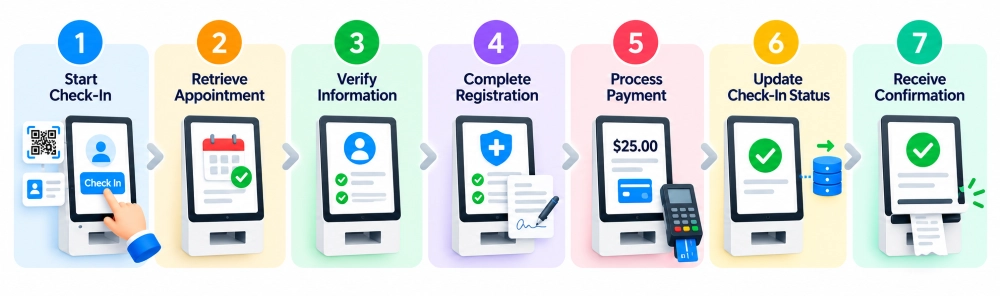
Start Check-In → Retrieve Appointment → Verify Information → Complete Registration → Process Payment → Update Check-In Status → Receive Confirmation.
Security and HIPAA Considerations for Kiosk Integration
Healthcare kiosks may process electronic protected health information (ePHI). As a result, security must be considered throughout the integration, not added after development.
In the United States, the HIPAA Security Rule requires covered entities and business associates to implement appropriate administrative, physical, and technical safeguards to protect ePHI.
For patient check-in kiosks, important safeguards include:
- Secure Connections: Encrypt data exchanged between kiosks and healthcare systems.
- Access Control: Restrict access to authorized information and functions.
- Session Security: Automatically end inactive sessions and clear patient data.
- Audit Logging: Track system activities for security monitoring.
- Screen Privacy: Prevent unauthorized viewing of patient information.
- Data Protection: Minimize local storage of sensitive information.
- Device Security: Maintain software updates and restrict unauthorized access.
Healthcare organizations must assess third-party vendors and applicable business associate agreements (BAAs). HIPAA compliance requires comprehensive security safeguards, not just encryption or EHR integration.
Common Patient Check-In Kiosk Integration Challenges
Even when the touchscreen interface works correctly, integrations can encounter problems involving data access, communication, and transaction processing.
Planning for these issues before deployment helps create more dependable check-in workflows.
| Integration challenge | Recommended approach |
| Limited EHR/EMR API access | Confirm supported interfaces, permissions, and vendor requirements before development |
| Duplicate or mismatched patient records | Use approved patient matching rules and require further verification for uncertain matches |
| Delayed check-in updates | Confirm backend responses and track unresolved status changes |
| Failed payment communication | Preserve transaction references and reconcile payment status before retrying |
| Network connectivity problems | Display a safe fallback and avoid falsely confirming unsynchronized check-ins |
| Incomplete insurance information | Allow controlled correction or staff-assisted verification |
One especially important consideration is what happens during a network outage. Kiosks may display basic instructions, but live verification, eligibility checks, and EHR updates may be unavailable.
Offline functionality must meet security and synchronization requirements. Before deployment, test failed payments, duplicate submissions, canceled appointments, and connection issues.
How Linkitsoft Can Help With Patient Check-In Kiosk Integration
Linkitsoft offers custom healthcare kiosk software development services to simplify patient registration, automate check-ins, and integrate kiosks with existing healthcare systems.
Our services include:
- EHR/EMR Integration: Connect kiosks with patient records and appointment systems.
- Payment Integration: Enable secure copay collection and billing synchronization.
- Identity Verification: Integrate ID scanners and patient verification tools.
- Custom Kiosk Development: Build user-friendly touchscreen interfaces and automated workflows.
- Ongoing Support: Provide software testing, deployment, and maintenance.